维修作业报告书表单模版代码
一、整体定位
这是一份可直接在浏览器中打开、填写并打印的交互式维修作业报告单,适用于设备维修服务单位(如空压机、自动化设备等售后维修部门)。它替代了传统纸质表格,所有字段均可直接在页面上点击输入或修改,并保留打印输出功能。
二、页面结构及可编辑区域
报告书按实际业务流程分为五大板块,除固定标题外,几乎所有内容都支持就地编辑:
- 公司抬头
- 顶部中英文名称(如“惠州市XXX技术有限公司”)可直接点击修改,方便不同公司直接套用模板。
- 报告标题区
- 左侧固定显示“维修作业报告书”;
- 右侧包含“日期”输入框(可填写日期)和“有偿/无偿服务”复选框(按需勾选)。
- 客户及设备信息表
- 表格列出:客户名称、地址、设备品名、型号、设备编号。
- 每个字段均为输入框,点击即可填写,适合现场快速录入。
- 故障原因分析及处理情况
- 这是一个大文本框(最小高度180px,可拖拽缩放),用于详细描述故障现象、分析原因及采取的维修措施。支持多行文字,内容不限。
- 签章及辅助信息
- 底部设有“维修人”、“审核人”和“日期”三个独立输入框,便于完成签字确认流程。
- 下方附有“此报告一式两份”的备注说明。
三、交互与体验亮点
- 全页面实时编辑:所有文本框、内容可编辑区域(
contenteditable)在聚焦时会有浅色背景反馈,输入框获得焦点时显示下划线提示,操作自然流畅。 - 响应式打印优化:内置
@media print样式,打印时自动去除背景色、保留边框和输入内容,确保纸质输出清晰规整。 - 无外部依赖:纯HTML+CSS,无需网络,打开即用,可保存为本地文件或部署到内网。
四、适用场景
- 维修工单录入(现场用平板/电脑填写)
- 售后维修记录存档
- 客户签收凭证
- 作为公司内部作业流程的标准化表单
<!DOCTYPE html>
<html lang="zh-CN">
<head>
    <meta charset="UTF-8">
    <meta name="viewport" content="width=device-width, initial-scale=1.0">
    <title>维修作业报告书</title>
    <style>
        * {
            margin: 0;
            padding: 0;
            box-sizing: border-box;
        }
        body {
            font-family: "Microsoft YaHei", "SimSun", sans-serif;
            background: #f2f2f2;
            display: flex;
            justify-content: center;
            padding: 30px 20px;
        }
        .report {
            max-width: 900px;
            width: 100%;
            background: white;
            padding: 30px 35px 40px;
            box-shadow: 0 4px 12px rgba(0,0,0,0.1);
            border-radius: 8px;
        }
        .header {
            text-align: center;
            border-bottom: 3px double #2c3e50;
            padding-bottom: 12px;
            margin-bottom: 18px;
        }
        .header h1 {
            font-size: 26px;
            letter-spacing: 4px;
            color: #1a3c5e;
            /* 可编辑时的光标样式 */
            outline: none;
            transition: background 0.2s;
        }
        .header h1:hover {
            background: #f0f6ff;
        }
        .header .en {
            font-size: 14px;
            color: #555;
            letter-spacing: 1px;
            margin-top: 2px;
            outline: none;
            transition: background 0.2s;
        }
        .header .en:hover {
            background: #f0f6ff;
        }
        .sub-title {
            display: flex;
            justify-content: space-between;
            align-items: center;
            font-size: 16px;
            margin: 6px 0 16px 0;
            padding: 0 5px;
        }
        .sub-title .date {
            font-weight: bold;
        }
        .sub-title .service-type {
            display: flex;
            gap: 20px;
            align-items: center;
        }
        .sub-title .service-type label {
            display: inline-flex;
            align-items: center;
            gap: 4px;
            font-weight: normal;
        }
        .sub-title .service-type input[type="checkbox"] {
            width: 16px;
            height: 16px;
            accent-color: #1a3c5e;
        }
        .info-table {
            width: 100%;
            border-collapse: collapse;
            margin: 12px 0 18px 0;
            font-size: 15px;
        }
        .info-table td {
            border: 1px solid #333;
            padding: 8px 12px;
            vertical-align: middle;
        }
        .info-table .label {
            font-weight: bold;
            background: #f0f4f8;
            width: 15%;
            text-align: center;
        }
        .info-table .content {
            width: 35%;
        }
        .info-table .content input,
        .info-table .content textarea {
            width: 100%;
            border: none;
            background: transparent;
            font-size: 15px;
            font-family: inherit;
            outline: none;
            padding: 2px 0;
        }
        .info-table .content input {
            height: 30px;
        }
        .info-table .content textarea {
            resize: vertical;
            min-height: 30px;
        }
        .info-table .content input:focus,
        .info-table .content textarea:focus {
            border-bottom: 2px solid #1a3c5e;
            background: #fafcff;
        }
        .section-title {
            font-size: 17px;
            font-weight: bold;
            margin: 22px 0 10px 0;
            padding-left: 8px;
            border-left: 6px solid #1a3c5e;
            color: #1a3c5e;
        }
        .fault-area {
            border: 1px solid #333;
            padding: 12px 14px;
            min-height: 180px;
            margin-bottom: 10px;
        }
        .fault-area textarea {
            width: 100%;
            min-height: 180px;
            border: none;
            font-size: 15px;
            font-family: inherit;
            resize: vertical;
            outline: none;
            padding: 4px 0;
            line-height: 1.7;
        }
        .fault-area textarea:focus {
            background: #fafcff;
        }
        .signature-area {
            display: flex;
            justify-content: space-between;
            margin-top: 30px;
            padding-top: 20px;
            border-top: 1px solid #ccc;
            font-size: 15px;
        }
        .signature-area .item {
            display: flex;
            align-items: center;
            gap: 6px;
        }
        .signature-area .item input {
            border: none;
            border-bottom: 1px solid #333;
            width: 150px;
            padding: 2px 4px;
            font-size: 15px;
            background: transparent;
            outline: none;
        }
        .signature-area .item input:focus {
            border-bottom-color: #1a3c5e;
        }
        .remark {
            margin-top: 12px;
            font-size: 13px;
            color: #666;
            text-align: right;
        }
        /* 打印适配 */
        @media print {
            body { background: white; padding: 0; }
            .report { box-shadow: none; border-radius: 0; }
            .info-table .content input,
            .info-table .content textarea,
            .fault-area textarea,
            .signature-area .item input {
                border-bottom: 1px solid #000 !important;
                background: transparent !important;
            }
            .header h1:hover, .header .en:hover {
                background: transparent !important;
            }
        }
    </style>
</head>
<body>
    <div class="report">
        <!-- 头部:中文标题和英文标题均可直接点击修改 -->
        <div class="header">
            <h1 contenteditable="true">惠州市XXX技术有限公司</h1>
            <div class="en" contenteditable="true">HUIZHOU  TECHNOLOGY CO., LTD</div>
        </div>

        <!-- 标题与日期 / 有偿/无偿 -->
        <div class="sub-title">
            <span style="font-size:20px; font-weight:bold;">维修作业报告书</span>
            <span class="date">日期:<input type="text" style="border:none;border-bottom:1px solid #333;width:120px;font-size:15px;padding:0 4px;" placeholder="年 月 日"></span>
            <span class="service-type">
                <label><input type="checkbox"> 有偿服务</label>
                <label><input type="checkbox"> 无偿服务</label>
            </span>
        </div>

        <!-- 客户及设备信息 -->
        <table class="info-table">
            <tr>
                <td class="label">客户名称</td>
                <td class="content"><input type="text" placeholder="请输入客户名称"></td>
                <td class="label">地址</td>
                <td class="content"><input type="text" placeholder="请输入地址"></td>
            </tr>
            <tr>
                <td class="label">设备品名</td>
                <td class="content"><input type="text" placeholder="如:空压机"></td>
                <td class="label">设备型号</td>
                <td class="content"><input type="text" placeholder="如:CCU1000B5T"></td>
            </tr>
            <tr>
                <td class="label">设备编号</td>
                <td class="content" colspan="3"><input type="text" placeholder="请输入设备编号" style="width:60%;"></td>
            </tr>
        </table>

        <!-- 故障原因分析及处理情况 -->
        <div class="section-title">故障原因分析及处理情况:</div>
        <div class="fault-area">
            <textarea placeholder="请详细描述故障现象、分析原因及处理措施……(可多行填写)"></textarea>
        </div>

        <!-- 签章区域 -->
        <div class="signature-area">
            <span class="item">维修人:<input type="text" placeholder="姓名"></span>
            <span class="item">审核人:<input type="text" placeholder="姓名"></span>
            <span class="item">日期:<input type="text" placeholder="年 月 日"></span>
        </div>
        <div class="remark">(此报告一式两份,客户与维修单位各执一份)</div>
    </div>
</body>
</html>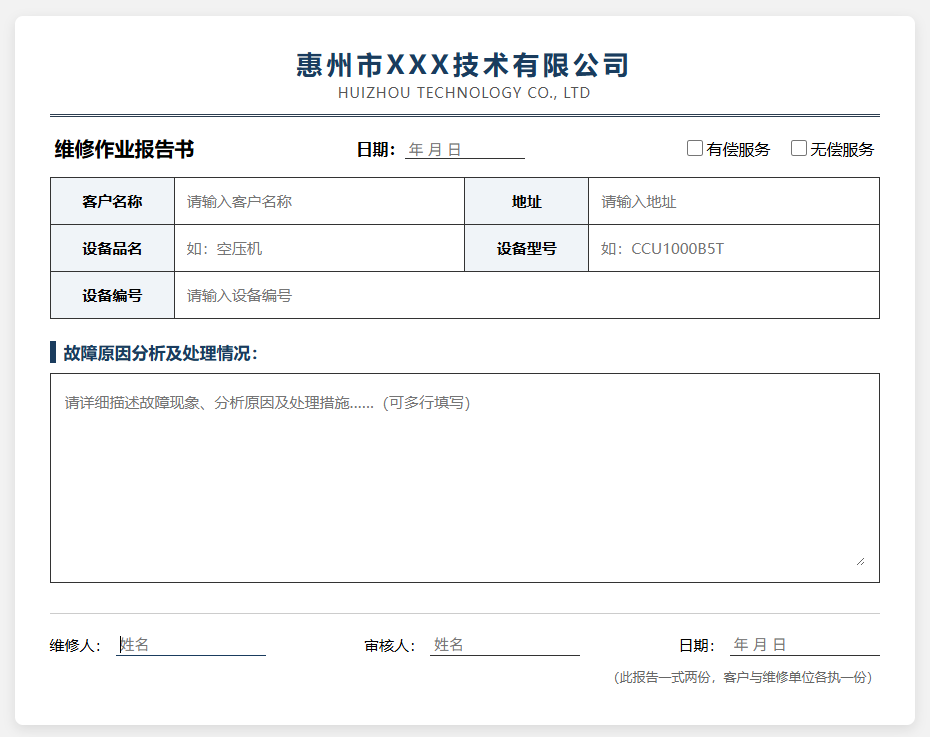
版权声明
本站部分内容源自互联网,仅供学习交流,如有侵权请联系我们删除。